What is Synthdo?
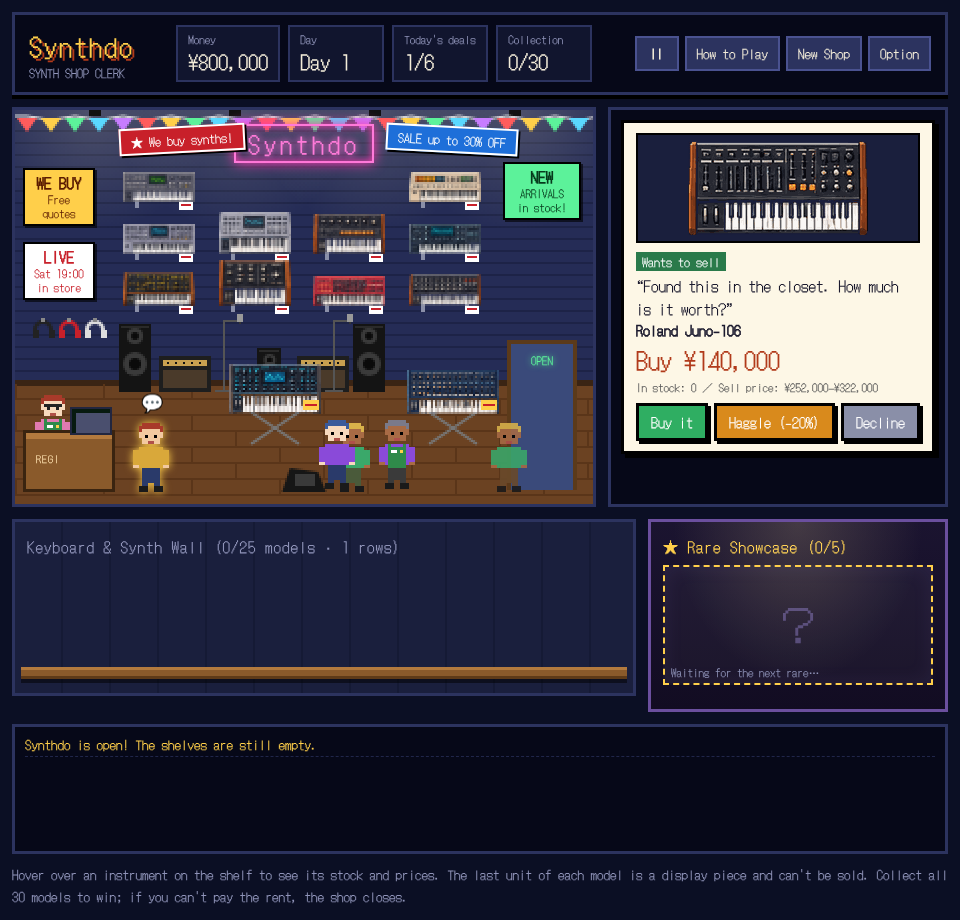
Synthdo: Synth Shop Clerk is a browser-based management game about running a small synthesizer shop. Customers bring instruments to sell and come looking for keyboards to buy. You decide which offers to take, keep enough stock for future customers, and try to turn a collection of empty shelves into a shop worth visiting.
The aim in Synthdo is to collect all 30 instrument models while keeping the business open. Your collection includes ordinary keyboards and rare finds for the showcase. Buying something new feels rewarding, but collection alone does not pay the rent: a shop full of display pieces can still run out of cash.
Synthdo's pixel-art store, original music and playable keyboard demos give those trading decisions their setting. This is the original game embedded from itch.io, with the developer's attribution retained. This page is an independent fan page, rather than an official developer website.
How to play Synthdo
Press Play Synthdo above, then use the original game's start screen. A customer offer explains whether someone wants to buy an instrument or sell one to your shop. Read the instrument name, stock count and offered price before choosing an action. Use a mouse to click the controls on desktop, or tap them on a phone.
Buy useful stock
A seller gives you a chance to add an instrument to the shop. In Synthdo, an unfamiliar model grows the collection, while another copy of a model you already own creates stock you can sell. Decide with both goals in mind.
Keep a display, sell the spares
The final copy of each model is a display piece. It stays in the collection and cannot be sold. A customer can only buy a spare, so owning a model and having that model available for sale are different things.
Finish the day with cash left
Check your money as well as your collection. Synthdo charges rent when the day ends. If you spend everything on purchases, a growing wall of instruments will not save a business that cannot pay its bills.
Each Synthdo customer allows one attempt to haggle. A failed negotiation can make the customer leave, so the lower price is a trade-off rather than a guaranteed improvement. You can also decline an offer when keeping cash matters more than another instrument.
The collection is also your business
Synthdo makes collecting and trading compete for the same money. The first copy of a model improves the collection, but a second copy can help fund your next purchase. The developer's practical advice is to keep spare stock instead of buying only instruments you have never seen.
Sales are generally around twice the buying price, according to the game's description. That describes the trading loop, not a promise that every customer or every deal will return the same profit. In Synthdo, read the current offer and your available stock before committing.
Rare synths arrive through customer offers and belong in the showcase. They are part of the collection objective, so pay attention when an unusual instrument appears. You can click the keyboards displayed in the shop to hear their demos, giving the collection a musical purpose as well as a numerical one.
Synthdo tips for a first shop
Balance new models and duplicates. In Synthdo, a shelf with one of everything may look successful while leaving nothing available to sell. Check whether a purchase will expand the collection, add a saleable spare, or simply reduce the cash you need for rent.
Read before haggling. Synthdo lets you negotiate once per customer. A good price still has to fit the shop's situation, and losing a customer is a possible outcome. Compare the offered instrument with your stock rather than pressing the same button for every visitor.
Use the shop's own feedback. Money, the day, today's deals and collection progress appear in the game's interface. Synthdo also keeps an on-screen event log. Those details explain what just happened more reliably than guessing from the appearance of the shelves.
Explore the instruments. Clicking a keyboard on the wall plays its demo. Synthdo is not only a race through purchases: hearing the collection is part of the experience. Enable sound when you want to explore it, and use Option if you prefer a quieter session.
Synthdo questions, answered
Is Synthdo free to play in a browser?
Yes. The original Synthdo HTML5 game can be played in a browser without downloading an installer. Press Play Synthdo on this page to load the developer’s game from itch.io. Purchases inside the shop use game currency, not real money.
Can I play Synthdo on my phone?
The developer lists desktop and phone support. Tap the shop controls on a phone, or use the mouse on desktop. Try Fullscreen for more room. If a smaller screen makes an offer hard to read, use a larger display.
How do I win Synthdo?
Collect all 30 instrument models without running out of money. The ordinary keyboard wall and rare showcase both matter to the collection. Keep enough money to pay rent as the days pass; an expanding collection does not automatically make the shop profitable.
Why can’t I sell an instrument I already own?
Synthdo keeps the last copy of every model as a display piece. You need another copy before that model can be sold. Check the stock information on the customer’s offer: a model in your collection is not necessarily available to sell.
How does haggling work in Synthdo?
You may haggle once with each customer. A successful negotiation improves the offer, but pushing too far can make the customer leave. Treat it as a decision about the current price and your cash, rather than a guaranteed discount.
Can I change Synthdo’s language or turn off its music?
Open Option inside Synthdo. The developer lists English, Japanese, Simplified Chinese, Traditional Chinese and Spanish, plus music and sound controls. On desktop, P or Esc pauses the game. Clicking a keyboard on the shop wall plays its demo.
Does this page provide an account or cloud save?
No separate player account or cross-device save service is provided by this fan page. The embedded game controls its own progress and browser storage. Do not assume a session will transfer between devices, browsers or different websites.
What if Synthdo does not load?
Give the original game time to load, check your internet connection and try reloading the page. Privacy or content-blocking settings may prevent a third-party game from loading. If it still does not open, use the original-game link below the player to try it directly on itch.io.
No comments yet. Tell other players what you learned in your first shop.